Appearance
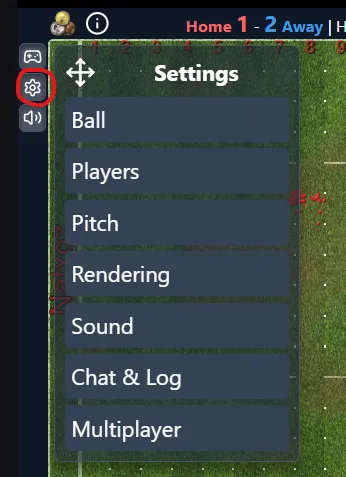
Settings
- Customize visuals, info density, sounds, and multiplayer behavior.
- Changes save per user when you click Save in a category.
Players
- Icons / Shorthand / Level dots
- Markings
- Auto-markings: show automatic player markings.
- Order: choose between Alphabetical and Site order.
- Tackle Zones
- Mode: choose between:
- Off - hide all tackle zones
- Home - show only the home team's zones
- Away - show only the away team's zones
- Both - show both teams' zones
- Passive - show only the non-active/opponent team, except during setup/kickoff where both are shown
- Single TZ: collapse overlapping zones into a single highlight instead of stacking
- Contour: draw an outline around each zone in addition to the filled area
- Opacity: adjust transparency level of zone highlights
- Mode: choose between:
Ball
- Toggle ball image and ping animation.
Pitch
- Standard vs weather-based pitch
- Field numbers
- Blood spots
Rendering
- Animations on/off
- Dice display
- Removal reasons: display why a player left the field
Sound
- Global mute
- Toggle specific spectator sound effects
Chat & Log
- New chat alert
- Compact logs
- Game log font size: choose how large log text should be.
- Chat font size: choose how large chat text should be.
- Dice feed starts visible: show the separate dice feed automatically.
- Dice feed transparency: adjust how much of the pitch is visible behind the dice feed.
Font sizes apply across layouts, including phone portrait, tablet portrait, tablet landscape, and landscape.
Multiplayer
- Allow/block pings and canvas drawings in shared rooms
- Optional drawing preview/approval behavior